FOREVERPLANNER 2026
Your entire year.
One simple place.
A minimal, hyperlinked digital planner designed for handwriting on reMarkable, Kindle Scribe, BOOX, and other PDF-compatible tablets.
- 365 Daily Pages
- Hyperlinked Navigation
- One-Time Purchase
Choose Orientation × Size × Color.
Which one should I choose?
Couldn't load pickup availability


01 / The planner
A year that makes sense at a glance.
Year

Month

Day

Start with the year. Move into the month. Open the day.
ForeverPlanner keeps the structure simple so you always know where you are and where you're going.
02 / Navigation
Year → Month → Day. In seconds.
Year view

↓ Tap a month
Month view
↓ Tap a day
Daily view

Write, then use Year, Month, Prev, or Next to move on.
Internal links connect the planner so you can move between your year, months, and individual days without scrolling through hundreds of pages.
Tap. Write. Move on.
03 / Daily planning
Enough structure. Enough space to think.
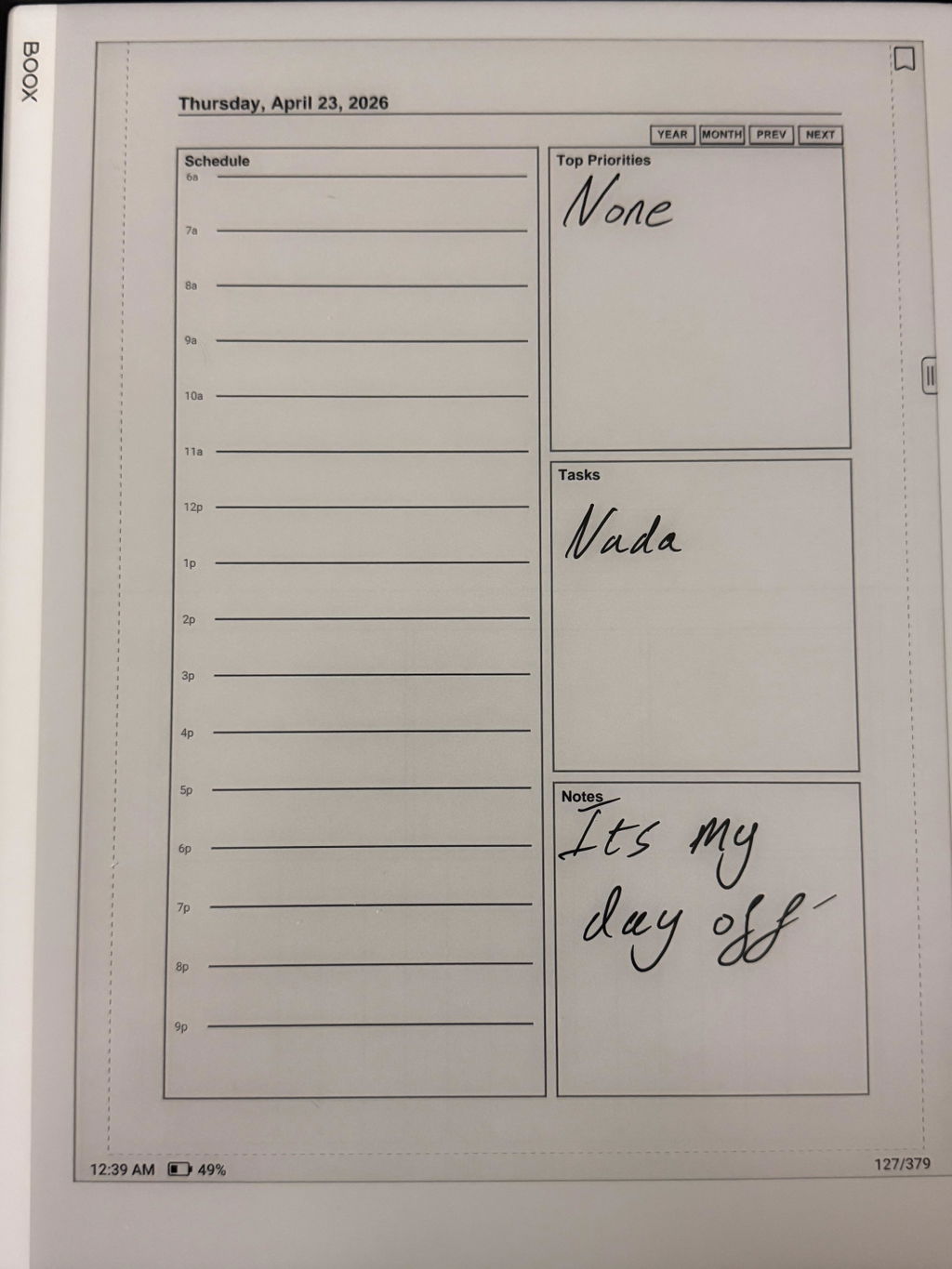
Schedule
A lined schedule for the shape of your day.
Top Priorities & Tasks

Keep priorities visible and check off tasks.
Notes

Open space for the thoughts worth keeping.
Planning shouldn't become another job.
Give your day structure, with room for handwriting and whatever the day brings.
04 / InkFirst design
Designed to be written on.
High-contrast layouts
Handwriting-friendly spacing
Clean page structure
Minimal visual clutter
ForeverPlanner was designed around handwriting on e-ink displays.
The interface stays out of the way so the planner feels more like a notebook and less like an app.
No pop-ups. No notifications. No productivity dashboard competing for your attention.
Just your plans and your handwriting.
05 / Your layout
Your planner. Your way.
Orientation
Portrait
Traditional notebook-style planning and vertical tablet use.
Orientation
Landscape
Wider writing space and horizontal tablet use.
Size
Tablet
Full-size tablet/e-ink displays.
Size
Mobile
Smaller displays and more compact viewing.
Color
B&W
Minimal monochrome layout for a classic e-ink appearance.
Color
Color
Restrained color accents for devices that support color.
Select Orientation × Size × Color before purchasing.
06 / Ownership
Buy the planner. Keep the planner.
$9.99 ONCE
NO SUBSCRIPTION
NO ACCOUNT
NO ADS
ForeverPlanner is a digital PDF you purchase once and keep.
No monthly fee. No annual renewal. No productivity app subscription.
Your 2026 planner stays yours.
07 / Compatibility
Made for your e-ink workflow.
reMarkable
Kindle Scribe
BOOX
ForeverPlanner is delivered as a PDF and is designed for devices and apps that support importing and annotating PDF documents.
Also works with other PDF-compatible tablets and note-taking apps. Hyperlink support depends on your PDF reader.
Not sure if it works with your device? Contact us before ordering.
08 / Get started
From download to planning in minutes.
01
Choose
Select Portrait or Landscape, Tablet or Mobile, and B&W or Color.
02
Download
Receive your digital planner after purchase.
03
Import
Import the PDF using your device's normal PDF workflow and start writing.
09 / Simple by design
Planning shouldn't become another thing to manage.
No complicated productivity methodology.
No account to maintain.
No subscription to remember.
No system telling you how to organize your life.
Just a thoughtfully designed place for your year, your plans, and your handwriting.
Plan clearly. Write freely. Keep going.
10 / Questions, answered
A few practical details.
What exactly do I receive?
A digital PDF planner for 2026 in your selected Orientation, Size, and Color, with a year index, monthly views, 365 daily pages, and internal navigation links. This is a digital product; no physical planner is shipped.
Which version should I choose?
Choose Portrait for vertical notebook-style planning or Landscape for wider horizontal writing space. Choose Tablet for full-size displays or Mobile for smaller displays. Choose B&W for monochrome or Color for restrained color accents. See the version guide.
Does ForeverPlanner work with reMarkable?
ForeverPlanner is designed for PDF-compatible reMarkable tablets. Import it using your device's normal PDF workflow.
Does ForeverPlanner work with Kindle Scribe?
ForeverPlanner is designed for Kindle Scribe. Use your device's supported PDF import and annotation workflow.
Does ForeverPlanner work with BOOX?
ForeverPlanner is designed for PDF-compatible BOOX tablets. Import and annotate it using your device's normal PDF workflow.
How do the hyperlinks work?
Select a month from the year index, then a day from the monthly view. Daily pages include Year, Month, Prev, and Next navigation. Use the link-following controls supported by your PDF reader.
How do I install/import the planner?
After receiving your planner, import the PDF using your device's normal PDF workflow. Contact us if you need help with your device.
Is this a subscription?
No. ForeverPlanner 2026 is a one-time purchase. There is no monthly fee or annual renewal. This purchase is for the 2026 edition.
Can I use ForeverPlanner on more than one device?
Contact us to confirm the licence terms for your intended multi-device use before ordering.
Can I print ForeverPlanner?
Contact us to confirm printing permissions before ordering.
What is the refund policy for digital products?
Please review our refund policy and contact us to confirm eligibility for a digital planner purchase.
Works great, has everything you need from a planner and looks good
Very intuitive and full of features that I didn't know I needed
perfect
this planner has fit my needs for weekly meal planning and daily work task planning. the hyperlinks make sense and help navigation.
I would it was great to have it free but it doesn't fit vertically on my note. air 4c - only works landscape, which is for my use case is not ideal
Appreciate you calling that out 🙏
We actually added this based on feedback like yours, you can now choose portrait or landscape depending on your setup, so it should fit your Note Air 4C vertically now.
Would love if you give the updated version a try and let me know if it feels better
Complete your e-ink setup.
-
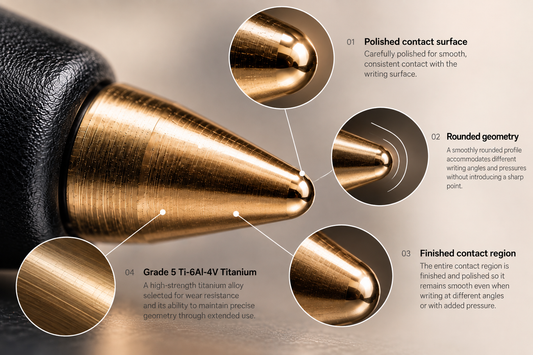
ForeverTip – Titanium Tip for reMarkable, Kindle Scribe & BOOX
Regular price $29.99 USDRegular price